
Choosing permissions in the Dashboard
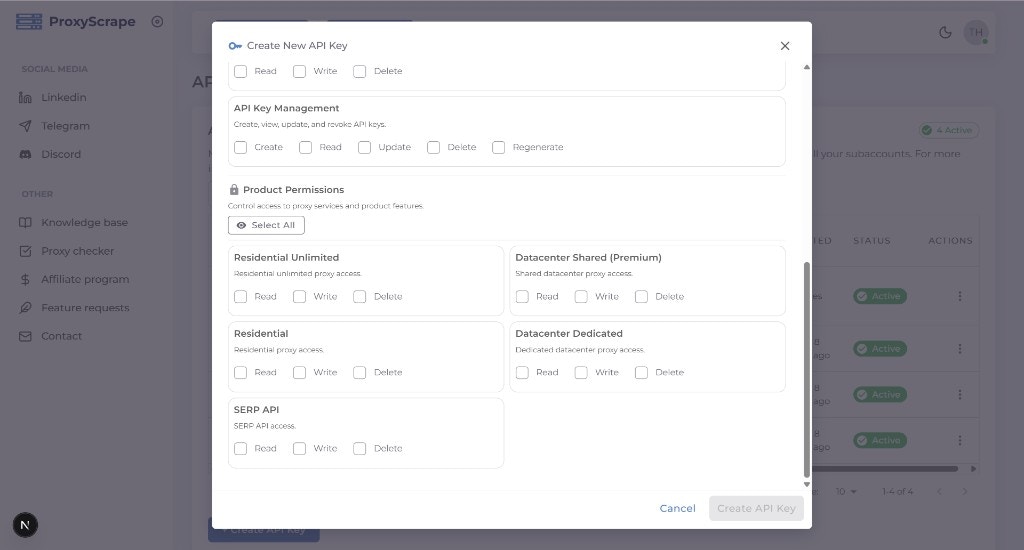
When you create or edit an API key, the modal displays a structured permissions picker with two sections:- Account Management — Permissions for managing API keys themselves (
create,read,update,delete,regenerate). - Product Permissions — Permissions for each product your account has access to (datacenter, residential, residential unlimited, SERP API, subaccounts). Each product shows
read,write, anddeletetoggles.
Permission format
-
Two-part (product) permissions:
resource:actionExamples:datacenter_shared:read,residential:write,serp_api:delete. The resource is a product or area (e.g. datacenter_shared, residential, serp_api); the action is typicallyread,write, ordelete. -
Three-part (Account API key) permissions:
account:apikeys:actionExamples:account:apikeys:create,account:apikeys:read,account:apikeys:update,account:apikeys:delete,account:apikeys:regenerate. These control whether the key can create, list, update, delete, or regenerate API keys for the account.
How allowed permissions are determined
You can only assign permissions that your account is allowed. The available set depends on your account’s products and plan.Discovering allowed permissions via API
- GET /v4/account/api-keys/permission-context — Returns the full structure of available permissions (resources, actions, and account API key permissions) and how they apply to your account.
- GET /v4/account/api-keys/allowed-permissions — Returns the flat list of permission strings you are allowed to grant (e.g. for building a custom UI or validating the
permissionsarray when creating a key programmatically).
allowed-permissions returns { allowed_permissions: [...] }, and permission-context returns { structure, allowed_permissions } — there is no success or data wrapper.
Permission reference
Quick reference of product and account API key permissions.