> ## Documentation Index
> Fetch the complete documentation index at: https://docs.proxyscrape.com/llms.txt
> Use this file to discover all available pages before exploring further.
# Permissions
> How API key permissions work, how to choose them in the dashboard, and how to discover them via the API.
API keys are granted a set of **permissions** that define what the key can do. You can choose permissions visually in the dashboard or query the API for the available set.
## Choosing permissions in the Dashboard
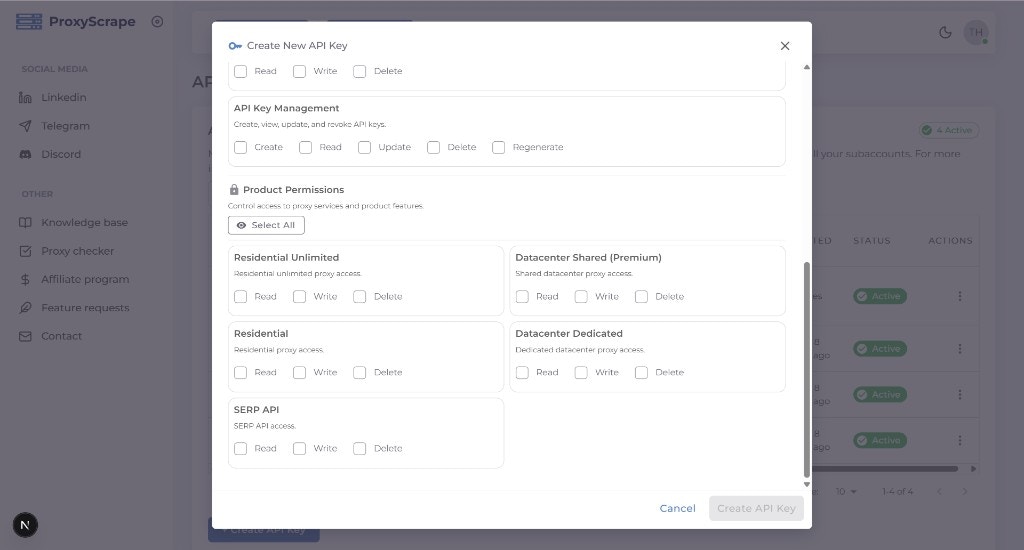
When you [create](/api/account/create) or [edit](/api/account/lifecycle) an API key, the modal displays a structured permissions picker with two sections:
* **Account Management** — Permissions for managing API keys themselves (`create`, `read`, `update`, `delete`, `regenerate`).
* **Product Permissions** — Permissions for each product your account has access to (datacenter, residential, residential unlimited, SERP API, subaccounts). Each product shows `read`, `write`, and `delete` toggles.
Use the **bulk action buttons** ("Read All", "Write All", "Delete All") to quickly select permissions across all products. Only permissions your account is allowed to grant are shown.
 ## Permission format
* **Two-part (product) permissions:** `resource:action`
Examples: `datacenter_shared:read`, `residential:write`, `serp_api:delete`.
The resource is a product or area (e.g. datacenter\_shared, residential, serp\_api); the action is typically `read`, `write`, or `delete`.
* **Three-part (Account API key) permissions:** `account:apikeys:action`
Examples: `account:apikeys:create`, `account:apikeys:read`, `account:apikeys:update`, `account:apikeys:delete`, `account:apikeys:regenerate`.
These control whether the key can create, list, update, delete, or regenerate API keys for the account.
## How allowed permissions are determined
You can only assign permissions that your account is allowed. The available set depends on your account's products and plan.
## Discovering allowed permissions via API
* **GET /v4/account/api-keys/permission-context** — Returns the full structure of available permissions (resources, actions, and account API key permissions) and how they apply to your account.
* **GET /v4/account/api-keys/allowed-permissions** — Returns the flat list of permission strings you are allowed to grant (e.g. for building a custom UI or validating the `permissions` array when creating a key programmatically).
Both endpoints return the payload directly: `allowed-permissions` returns `{ allowed_permissions: [...] }`, and `permission-context` returns `{ structure, allowed_permissions }` — there is no `success` or `data` wrapper.
Quick reference of product and account API key permissions.
## Permission format
* **Two-part (product) permissions:** `resource:action`
Examples: `datacenter_shared:read`, `residential:write`, `serp_api:delete`.
The resource is a product or area (e.g. datacenter\_shared, residential, serp\_api); the action is typically `read`, `write`, or `delete`.
* **Three-part (Account API key) permissions:** `account:apikeys:action`
Examples: `account:apikeys:create`, `account:apikeys:read`, `account:apikeys:update`, `account:apikeys:delete`, `account:apikeys:regenerate`.
These control whether the key can create, list, update, delete, or regenerate API keys for the account.
## How allowed permissions are determined
You can only assign permissions that your account is allowed. The available set depends on your account's products and plan.
## Discovering allowed permissions via API
* **GET /v4/account/api-keys/permission-context** — Returns the full structure of available permissions (resources, actions, and account API key permissions) and how they apply to your account.
* **GET /v4/account/api-keys/allowed-permissions** — Returns the flat list of permission strings you are allowed to grant (e.g. for building a custom UI or validating the `permissions` array when creating a key programmatically).
Both endpoints return the payload directly: `allowed-permissions` returns `{ allowed_permissions: [...] }`, and `permission-context` returns `{ structure, allowed_permissions }` — there is no `success` or `data` wrapper.
Quick reference of product and account API key permissions.