> ## Documentation Index
> Fetch the complete documentation index at: https://docs.proxyscrape.com/llms.txt
> Use this file to discover all available pages before exploring further.
# Manage keys
> View, edit, regenerate, and revoke API keys from the dashboard or API.
You can manage your API keys from the **[dashboard](https://dashboard.proxyscrape.com/v2/account/api-keys)** or programmatically via the API. The dashboard gives you a visual overview of all keys and quick access to edit, regenerate, or revoke them.
## Manage keys in the Dashboard
### View your keys
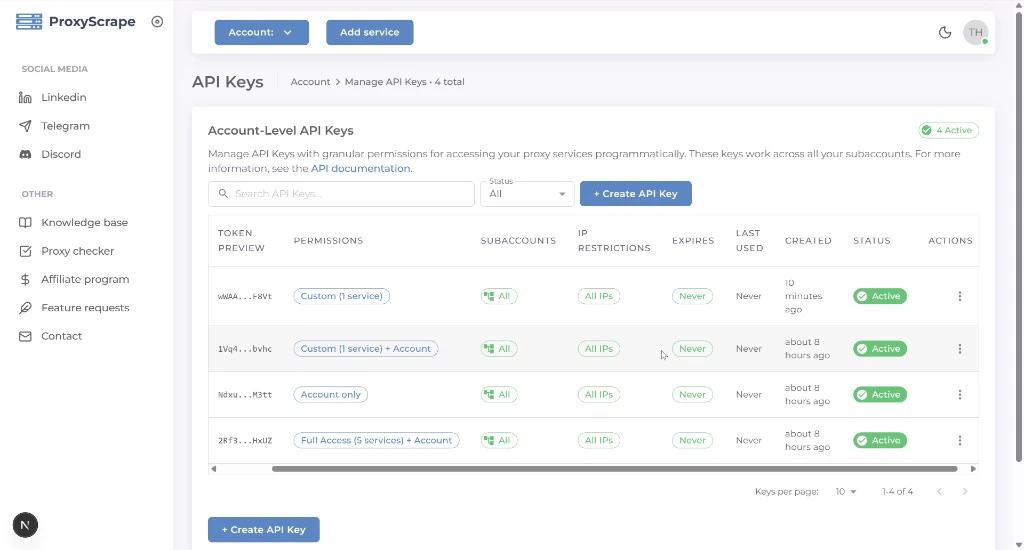
Open the **profile icon** (top right) in the dashboard and select **API Keys**, or go to **[/account/api-keys](https://dashboard.proxyscrape.com/v2/account/api-keys)**. The table shows each key's name, permissions summary, status (active / inactive), creation date, expiry, and available actions.
You can search by name and filter by **Status** (`All`, `Active`, or `Inactive`). Deactivating a key (via edit → toggle inactive) keeps it in the list under **All** / **Inactive** — it stops working for authentication until you reactivate it. Revoking (delete) permanently removes the key.
 ### Edit a key
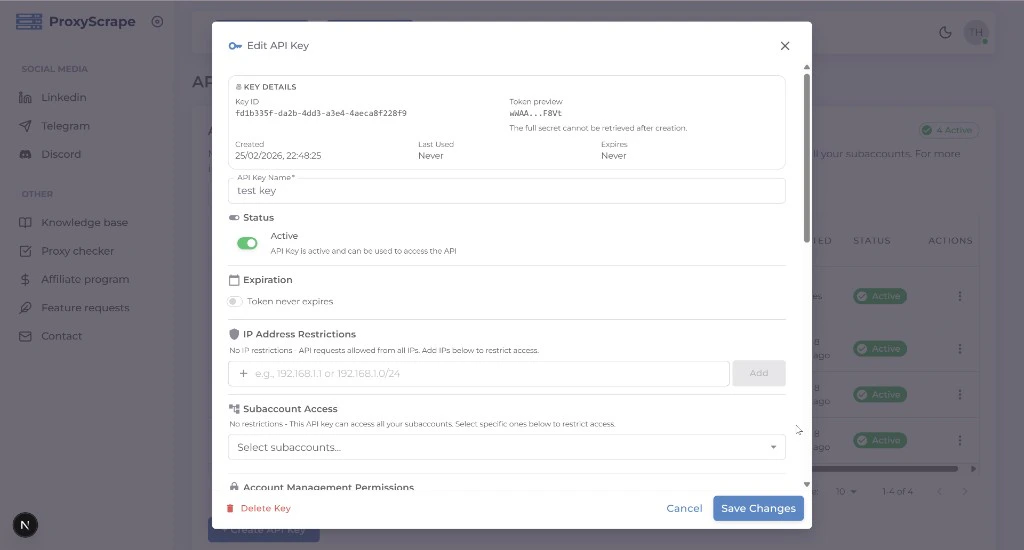
Click the **edit** icon on any key row to open the edit modal. You can change the key's name, permissions, subaccount access, IP restrictions, expiration, and active status. The same form fields from [creation](/api/account/create) are available.
### Edit a key
Click the **edit** icon on any key row to open the edit modal. You can change the key's name, permissions, subaccount access, IP restrictions, expiration, and active status. The same form fields from [creation](/api/account/create) are available.
 ### Regenerate a secret
If a key's secret has been compromised or you need a new one, use the **regenerate** action from the key's row. The old secret stops working immediately and a new one is displayed.
### Regenerate a secret
If a key's secret has been compromised or you need a new one, use the **regenerate** action from the key's row. The old secret stops working immediately and a new one is displayed.
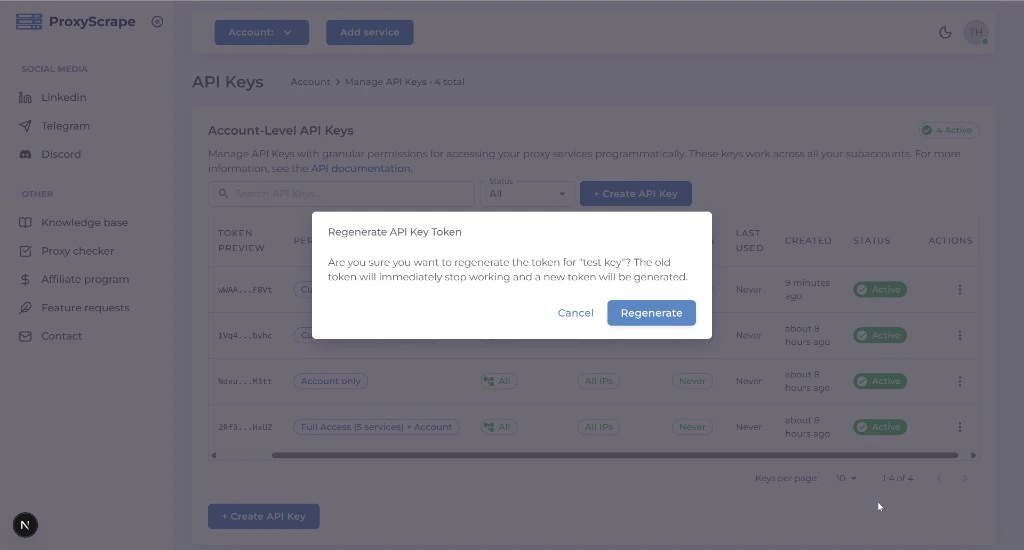 After regenerating, the new secret is shown only once. Copy and store it immediately.
### Revoke (delete) a key
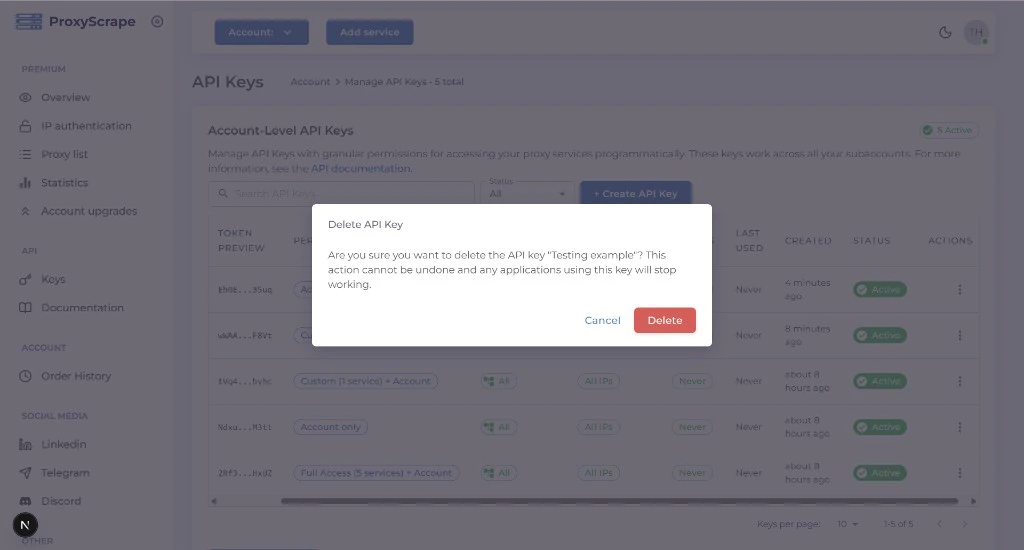
Click the **delete** icon on the key row. Revoking a key permanently removes it — it can no longer be used for authentication.
After regenerating, the new secret is shown only once. Copy and store it immediately.
### Revoke (delete) a key
Click the **delete** icon on the key row. Revoking a key permanently removes it — it can no longer be used for authentication.
 ## Manage keys via API
For automation and scripting, all key management operations are available via the API. Each request must be authenticated with an API key that has the required permission.
### List keys
**GET /v4/account/api-keys**
Returns API keys for the account. Response includes key id, name, permissions, `allowed_subaccounts`, `allowed_ips`, `expires_at`, `is_active`, and related metadata (the secret is never included).
**Query parameters**
| Param | Values | Description |
| -------- | ------------------------------------- | ---------------------------------------------------------------------------------------------------- |
| `status` | `all` (default), `active`, `inactive` | Filter by key status. Inactive keys are included in `all` and `inactive`. |
| `search` | string | Case-insensitive substring match on the key name. |
| `page` | integer ≥ 1 | Page number (with `limit`). |
| `limit` | integer ≥ 1 | Page size. When set, the response includes a `meta` object (`total`, `page`, `limit`, `totalPages`). |
```bash theme={null}
curl -X GET 'https://api.proxyscrape.com/v4/account/api-keys?status=inactive&limit=10&page=1' \
-H 'api-token: '
```
Requires `account:apikeys:read` permission.
### Get by ID
**GET /v4/account/api-keys/:id**
Returns a single API key by ID. The full token (secret) is never returned after creation; only metadata is available.
### Update a key
**PUT /v4/account/api-keys/:id**
Update the key's name, permissions, `allowed_subaccounts`, `allowed_ips`, `expires_at`, or `is_active`. Same body shape as [create](/api/account/create). Requires `account:apikeys:update` permission.
### Regenerate secret
**POST /v4/account/api-keys/:id/regenerate**
Generates a new secret for the key. The old secret stops working immediately. **The new secret is returned only in this response** — store it securely. Requires `account:apikeys:regenerate` permission.
You cannot regenerate the key you are currently using to authenticate the request. Use another API key to regenerate it.
### Revoke (delete) a key
**DELETE /v4/account/api-keys/:id**
Permanently revokes the key. It can no longer be used for authentication. Requires `account:apikeys:delete` permission.
You cannot delete the key you are currently using. Use another API key to revoke it.
## Manage keys via API
For automation and scripting, all key management operations are available via the API. Each request must be authenticated with an API key that has the required permission.
### List keys
**GET /v4/account/api-keys**
Returns API keys for the account. Response includes key id, name, permissions, `allowed_subaccounts`, `allowed_ips`, `expires_at`, `is_active`, and related metadata (the secret is never included).
**Query parameters**
| Param | Values | Description |
| -------- | ------------------------------------- | ---------------------------------------------------------------------------------------------------- |
| `status` | `all` (default), `active`, `inactive` | Filter by key status. Inactive keys are included in `all` and `inactive`. |
| `search` | string | Case-insensitive substring match on the key name. |
| `page` | integer ≥ 1 | Page number (with `limit`). |
| `limit` | integer ≥ 1 | Page size. When set, the response includes a `meta` object (`total`, `page`, `limit`, `totalPages`). |
```bash theme={null}
curl -X GET 'https://api.proxyscrape.com/v4/account/api-keys?status=inactive&limit=10&page=1' \
-H 'api-token: '
```
Requires `account:apikeys:read` permission.
### Get by ID
**GET /v4/account/api-keys/:id**
Returns a single API key by ID. The full token (secret) is never returned after creation; only metadata is available.
### Update a key
**PUT /v4/account/api-keys/:id**
Update the key's name, permissions, `allowed_subaccounts`, `allowed_ips`, `expires_at`, or `is_active`. Same body shape as [create](/api/account/create). Requires `account:apikeys:update` permission.
### Regenerate secret
**POST /v4/account/api-keys/:id/regenerate**
Generates a new secret for the key. The old secret stops working immediately. **The new secret is returned only in this response** — store it securely. Requires `account:apikeys:regenerate` permission.
You cannot regenerate the key you are currently using to authenticate the request. Use another API key to regenerate it.
### Revoke (delete) a key
**DELETE /v4/account/api-keys/:id**
Permanently revokes the key. It can no longer be used for authentication. Requires `account:apikeys:delete` permission.
You cannot delete the key you are currently using. Use another API key to revoke it.